Contact enrichment signals and missing-data indicators
Use enrichment and coverage signals to find and improve incomplete contact records.
This troubleshooting guide shows how to use the Contacts page summary metrics and the contacts table to identify records missing key information and to prioritise updates.
Quick checks
-
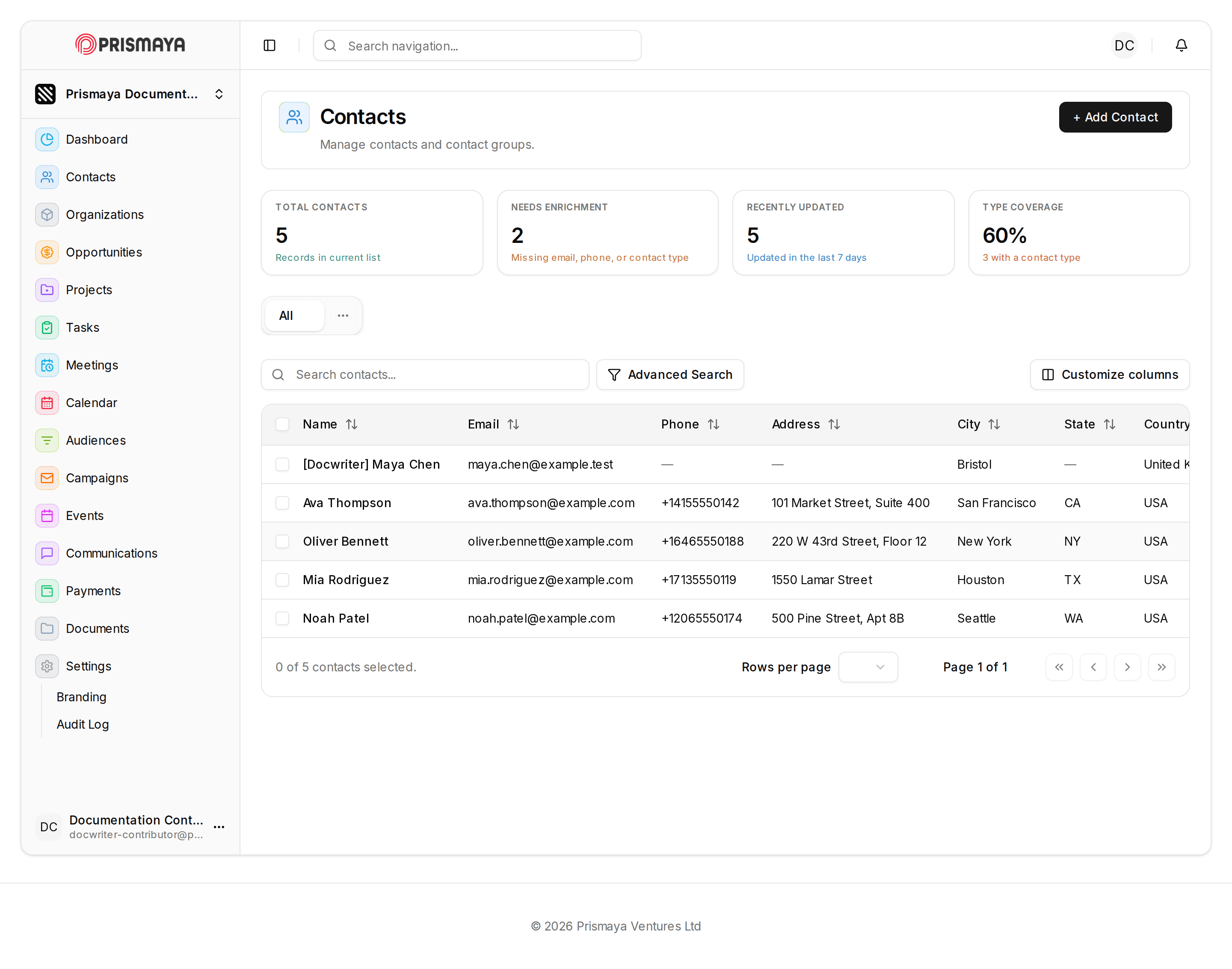
Read the summary cards
Inspect the four summary cards at the top of the Contacts page to understand overall data-quality signals for the current list.
- TOTAL CONTACTS card includes the metric value and the helper text: "Records in current list."
- NEEDS ENRICHMENT card's helper text reads: "Missing email, phone, or contact type."
- RECENTLY UPDATED card's helper text reads: "Updated in the last 7 days."
- TYPE COVERAGE card shows a percentage and the helper text: "3 with a contact type."
-
Scan the contacts table for missing fields
Browse the list view and use the Search contacts... input to locate rows that lack Email, Phone, or address details.
- Table columns include: Name, Email, Phone, Address, City, State, Country.
- Look for rows where Email or Phone cells are blank or contain a placeholder.
- The table footer shows selection status and pagination controls to move through pages of results.
-
Use coverage and enrichment together to prioritise work
Combine TYPE COVERAGE and NEEDS ENRICHMENT values to see how many contacts have a contact type versus how many are missing key fields, and prioritise updating records accordingly.
- TYPE COVERAGE reports the share of contacts that have a contact type and gives the helper detail: "3 with a contact type."
- NEEDS ENRICHMENT explicitly defines its criteria as: "Missing email, phone, or contact type."
-
Add or update contact records
Add new contacts with the + Add Contact control or update existing contacts to supply missing email, phone, or contact type information.
- Use Advanced Search and Customize columns to refine the list view or surface additional columns while you work.
- Prioritise contacts flagged by NEEDS ENRICHMENT and those without a contact type per TYPE COVERAGE when planning updates.
Fields and requiredness
The NEEDS ENRICHMENT helper text explicitly states: Missing email, phone, or contact type.
The TOTAL CONTACTS helper text explicitly states: Records in current list.
The RECENTLY UPDATED helper text explicitly states: Updated in the last 7 days.
The TYPE COVERAGE helper text explicitly states: 3 with a contact type.
The other Details fields are not marked as required.
Where to look
Documented surfaces for these checks: Contacts page (/dashboard/contacts) and the Contacts table (list view).
Use the Search contacts... input, the Rows per page selector, and the pagination controls to navigate and filter the list while checking records.