Contacts: list, search, filters, and column customization
Understand the Contacts list view in Prismaya: what information is presented, what list controls are visible, and which table columns and summary metrics appear on the page.
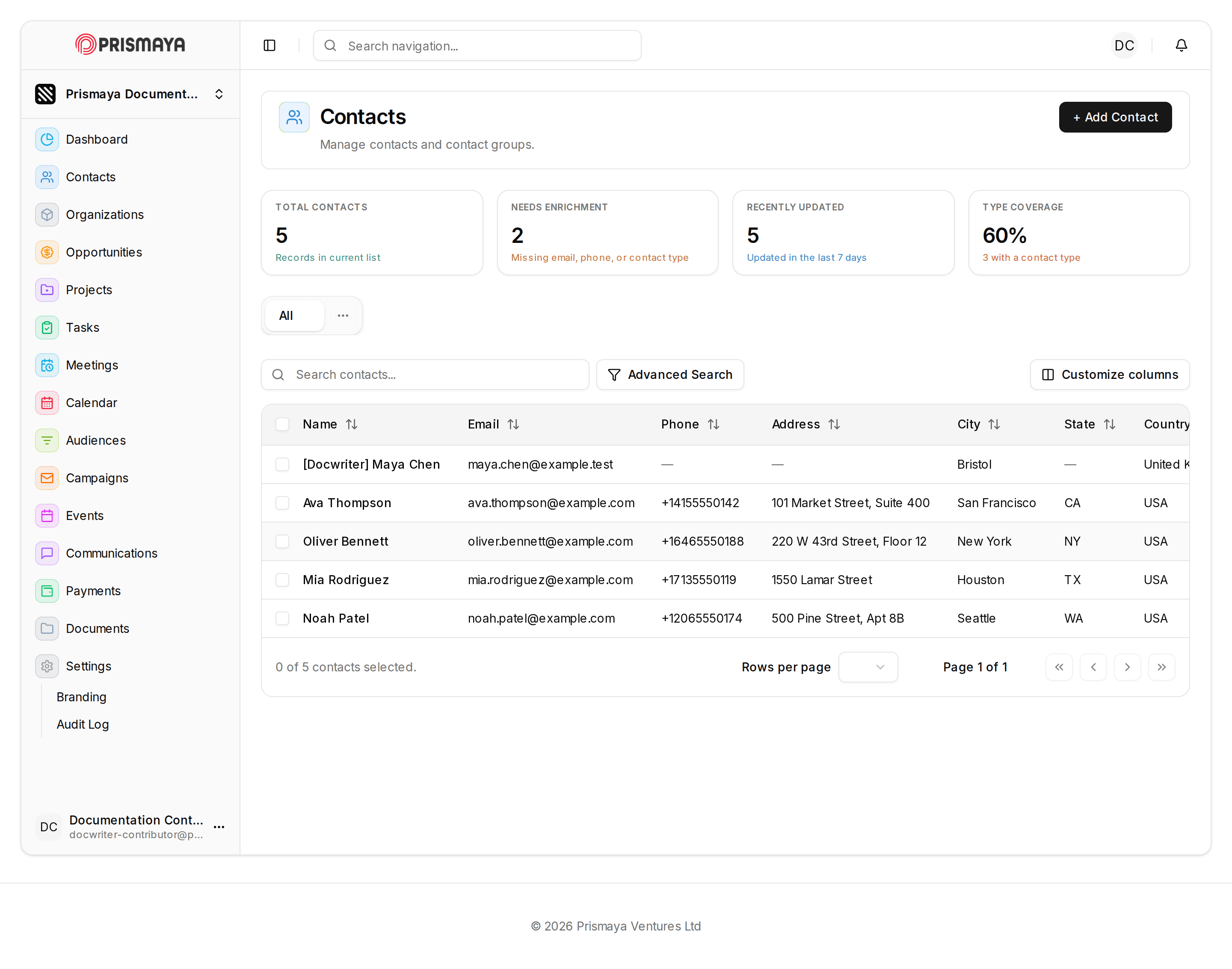
This reference describes the parts of the Contacts list view so you can find contact records, inspect summary metrics, and adjust which table columns appear. It summarizes the page header, the search and filter controls that are shown, the table columns by default, and the list-level controls and indicators present on the page.
Purpose
The Contacts page provides a list view for working with contact records and contact groups and displays summary metrics for the current list.
Summary metrics visible on the page
Four summary metric cards are with these headings and values: TOTAL CONTACTS (5), NEEDS ENRICHMENT (2), RECENTLY UPDATED (5), and TYPE COVERAGE (60%). These cards appear near the top of the Contacts view and provide at-a-glance metrics for the currently displayed list.
Search and filtering controls
A search input with the placeholder text "Search contacts..." is present for locating contacts by text. An "Advanced Search" control is adjacent to the search input. An "Open filter bar actions" control is also above the table area.
Table columns, selection, and pagination
A contacts table lists rows with these column headers: Name, Email, Phone, Address, City, State, Country, Contact type, Tags, Status, Source, and Updated.
A "Customize columns" control is above the table that relates to which columns are shown.
Each row includes a left-hand selection checkbox column; a footer below the table shows a selection summary ("0 of 5 contacts selected."). Pagination controls and a "Rows per page" control are below the table (Page 1 of 1 is shown).
List-level actions
A "+ Add Contact" control is in the top-right of the main panel.
A compact site-wide search/navigation input and a user avatar (initials "DC") are in the top bar.
Navigation and contextual labels
The left navigation/sidebar contains items including: Dashboard, Contacts, Organizations, Opportunities, Projects, Tasks, Meetings, Calendar, Audiences, Campaigns, Events, Communications, Payments, Documents, Settings, Branding, and Audit Log.
Top-left branding shows "PRISMAYA."
Requiredness of visible contact fields
Branding settings: manage outward-facing identity
Understand branding settings: manage outward-facing identity and when it is useful in Prismaya.
Tasks: list, search, and task fields
Understand the Tasks list page: controls for scanning, searching, and filtering tasks, the table columns shown for each task row, and pagination controls.